This article is also available on Medium.
The Model Context Protocol (MCP) is rapidly becoming the standard for connecting AI agents to real-world tools and data. However, managing these servers locally can often lead to environment conflicts, security concerns, and deployment friction.
Before MCP existed, connecting an AI model to external tools was painful. For every single tool whether it’s MongoDB, Obsidian, or Gmail you had to write custom glue code from scratch. Each integration had its own logic, its own format, its own maintenance cost. So if you had 5 tools? You had 5 completely different integrations to build and maintain. It was messy, time-consuming, and didn’t scale at all.
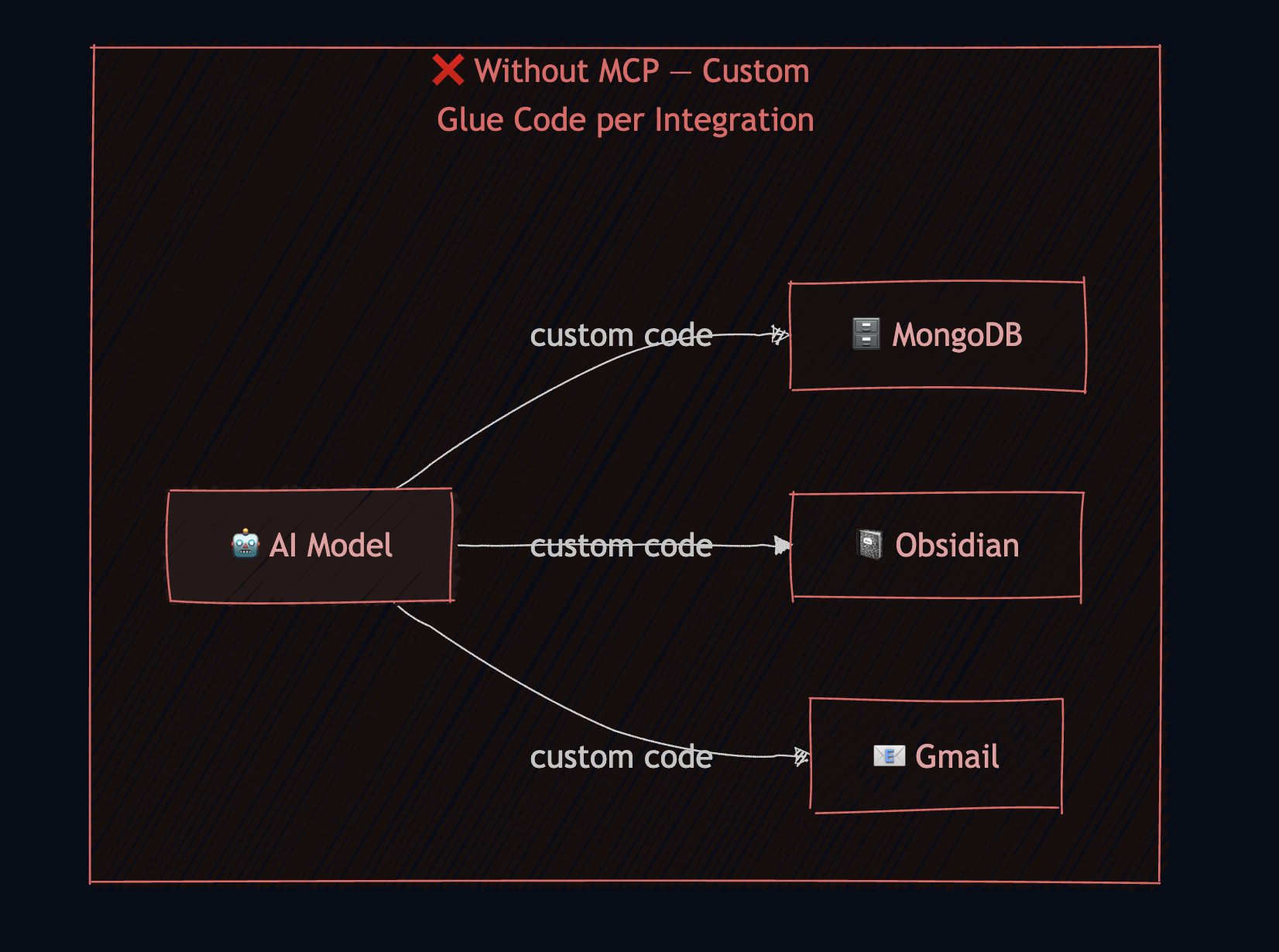
That’s exactly the problem MCP solves. MCP which stands for Model Context Protocol is an open standard that acts as a universal bridge between your AI model and any external tool. Instead of writing custom code for every integration, you just build one MCP server per tool, and your AI speaks the same language to all of them. MongoDB, Obsidian, Gmail they all plug in the same way. And the best part? You can build your own custom MCP server for any capability you need.
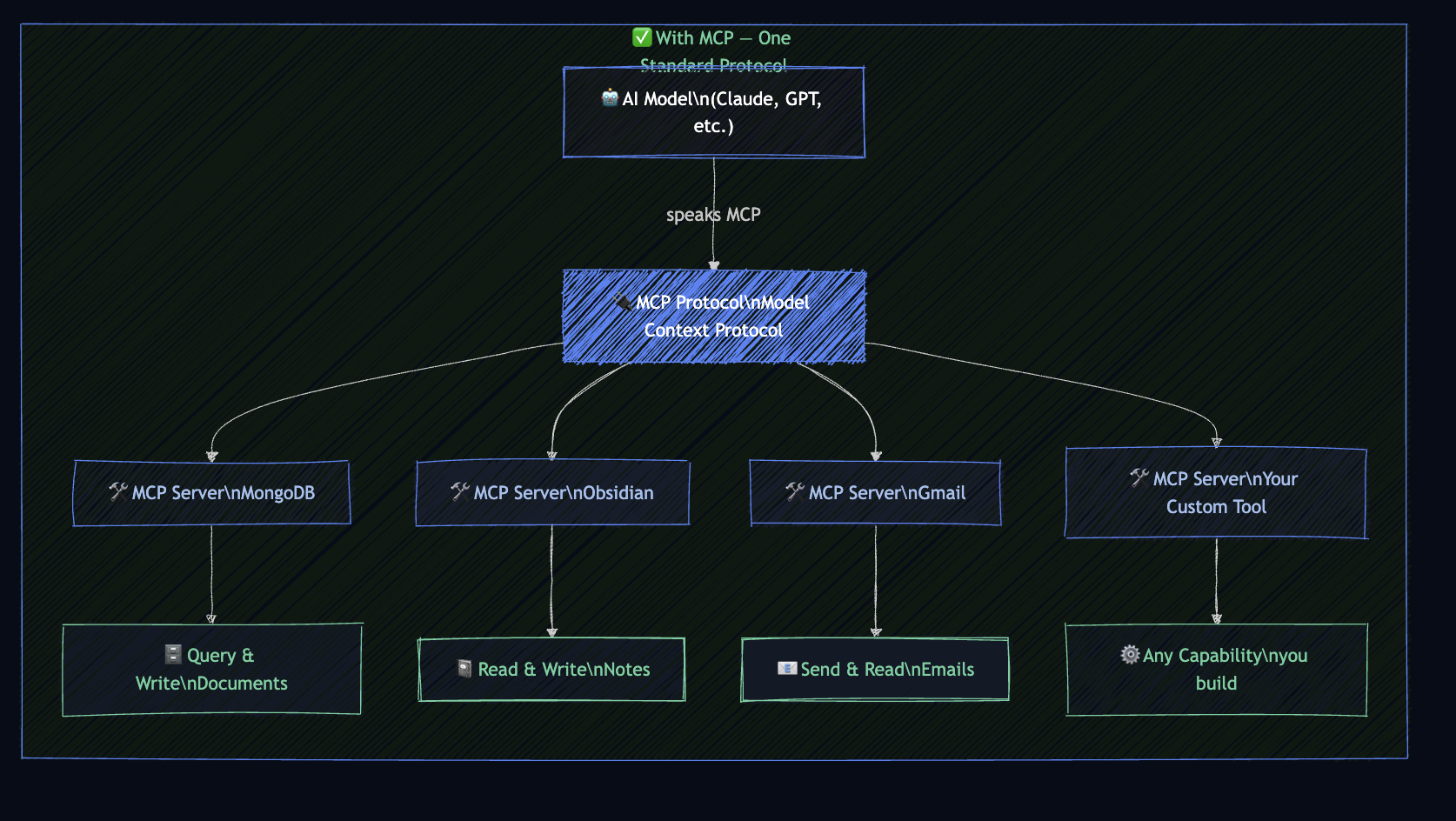
This is where the Docker MCP Toolkit comes in.
What is the Docker MCP Toolkit?
Docker MCP Toolkit is an interface built into Docker Desktop that lets you set up, manage, and run MCP servers using Docker containers. It allows you to connect them to AI agents incredibly easily, removing the friction from tool usage by offering secure defaults and a seamless setup.
It is fully compatible with major MCP clients like Claude and Cursor, and it even includes a growing catalog of ready-to-use MCP servers.
Why Use Docker for MCP?
Moving your MCP servers into containers provides three major advantages:
1. Security & Isolation
Each MCP server runs in its own container, completely isolated from your host system and from other servers. Docker also signs its official MCP images, allowing you to verify their integrity. Furthermore, you can leverage the Docker secret manager to store your sensitive credentials securely.
2. Easy Setup & Reproducibility
We’ve all faced “it works on my machine” issues. Docker packages everything the server needs—dependencies, runtime, and configuration—into a single image. You can spin up a complex MCP server in seconds without manually installing anything on your system.
3. Portability
A Dockerized MCP server runs the same way on any machine—your laptop, a colleague’s computer, or a cloud server. This consistency makes sharing setups across teams or moving from development to production straightforward.
4. Resource Management
With Docker, you can set strict limits on CPU and memory usage for each MCP server. This ensures that a resource-heavy tool won’t accidentally starve your system or other critical services.
5. Version Control & Easy Rollbacks
Docker images make it simple to version your MCP servers. If a new update introduces a bug, you can instantly roll back to a previous “known-good” image, ensuring your AI workflow remains uninterrupted.
Build Your Own with the Toolkit Template
If you’re looking to create your own MCP servers specifically for this ecosystem, I’ve put together a specialized template to help you get started:
mcp-toolkit-template on GitHub
This repository provides an interactive installation script that helps you:
- Scaffold new Python-based MCP servers using FastMCP.
- Automate Docker builds and image tagging.
- Register your local servers directly into Docker Desktop with a single command.
By combining the power of Docker with the flexibility of MCP, you can build powerful, secure, and portable tools that enhance your AI workflows.
Happy coding!